Avizo
What is Avizo?
Avizo Software is a powerful, commercial 3D visualization and analysis platform developed by Thermo Fisher Scientific, designed for scientific and industrial applications involving complex imaging data.
Core Capabilities
Avizo excels in:
- 3D Visualization: High-quality volume rendering, slicing, contouring, and iso-surfacing for interactive exploration of materials.
- Image Processing: Advanced filtering, artifact correction, and enhancement for CT, microscopy, and other imaging modalities.
- Segmentation: Automatic and manual tools for identifying and separating features like pores, grains, fibers, and particles.
- Quantification & Analysis: Over 70 built-in tools for measuring volume, shape, distribution, orientation, and more.
- Simulation Integration: Generates simulation-ready meshes for CFD (Computational Fluid Dynamics) and FEA (Finite Element Analysis), and supports direct computation of material properties like permeability and conductivity.
- Automation & Customization: Supports scripting (Python, TCL), MATLAB integration, and custom workflows for repeatable and scalable analysis.
- Presentation Tools: Enables creation of high-resolution images, animations, and reports for sharing results.
No Licences Left
If you see a license error, please hit the 'Show Details' button.
You may see an error message like this.
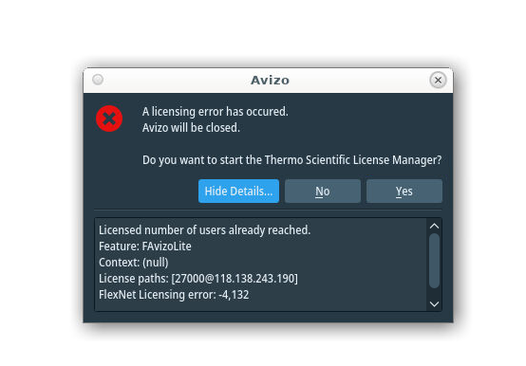
The message Licensed number of users already reached shows the issue. We only have 7 license tokens, and they are all taken at this point.
See the next section on how licenses are managed by the system. At this point you have to wait until other users release their tokens.
There is no easy way to show the number of free tokens on our system.
If you start Avizo and no window appears, then that takes up a token that prevents other users from using Avizo. See You start Avizo/Amira and nothing happens for what to do at this point. Feel free to contact the help desk if this problem presists, in case there is some other problem
Licences
Monash eResearch has bought a limited number of tokens (7) from Thermo Fisher. To access the software, users must agree to the Academic License Terms and Conditions through eResearch Resource Allocation System.
The licensing system we have is a Subscription license which comes in the form of a pool of Main licenses and a separate pool of Sub licenses. The pool of Main licenses is used to start the software and use basic features which are not part of any extension. Each instance of Avizo started consumes one such token which is freed when the software is closed.
The pool of Sub licenses is used to enable features provided by extensions, such as XLabSuite.
For each session of the software, one such token is used for each different extension used in that session, and using multiple different features from one same extension only uses one token for that extension.
These tokens are also freed when the software is closed.
Example:
- User A starts Avizo and runs the "Absolute Permeability Experiment Simulation" (XLabSuite) module
-> 1 Main token + 1 Sub token - User B starts Avizo and runs the "Absolute Permeability Experiment Simulation" (XLabSuite) and "Formation Factor Experiment Simulation" (XLabSuite) modules
-> 1 Main token + 1 Sub token - User C starts Avizo and runs the "Absolute Permeability Experiment Simulation" (XLabSuite) and "Interactive Thresholding" (3D Pro) modules
-> 1 Main token + 2 Sub tokens
This can quickly accumulate when multiple users are running complex workflows relying on various extensions. More details can be found in this article:
GPU Support
We now have Avzio 2025.1 installed. This fixed the bug mentioned below, and Avizo now works on A40, L40S, L4 GPUs. Please note:
- Avizo does not correctly load the correct settings for each GPU.
- Avizo2Go crashes
We have an open ticket with Thermo Fisher to try and resolve these issues.
Older versions of Avizo/Amira only works on P4 nodes. It should be supported on A40 and L40S nodes, but there is a bug in it that prevents this working. It is unlikely that this will be resolved until the next release (~October 2025). Avizo2GO should work on those nodes though.
A100 and H100 GPUs do not support openGL software at all, and can not be used.
Avizo from the command line
Avizo can be called from the Desktop menu. It can also be opened via a command line. This may show up any errors you see if there are any. Please open a terminal inside the Strudel Desktop. Then type the following lines:
module load avizo
vglrun Avizo3D
The other commands that can be typed include Amira3D and AvizoToGo
You start Avizo or Amira and nothing happens
We have noticed issues with Aviz/Amira not opening straight away, or not at all.
If the tools do not open immediately, do not click the menu/icon again. This opens multiple copies of the program and locks up license tokens.
- You must stop any Avizo/Amira processes that might be running. This is true if you use the Menu system to start the programs.
- On the compute node, open a terminal in Strudel using the Terminal icon at the top.
- Enter the appropiate command to search for a process.
ps aux | grep -i Avzio | grep $USERorps aux | grep -i Amira | grep $USER. If you see an output like this:
smichnow 2073798  4.8  0.0 816972 212704 pts/12  Sl+  10:38   0:00 /apps/avizo/2025.1/avizo/bin/arch-LinuxAMD64-Optimize/Avizo3D
smichnow 2074114  0.0  0.0   6532  2780 pts/17   S+   10:38   0:00 grep --color=auto Avizo3D
- Try and kill the Avizo/Amira you have with pkill e.g. type
pkill processid, where processid is the number in the 2nd column i.e. In the above example processid would be the number 2073798 - Do not try to kill the grep process, it has already finished.
- Check by running the ps command again. If you can't kill the process, stop the Desktop and try again.
- Then run this code in any terminal:
cd "${HOME}/.config/Thermo Fisher Scientific"
rm *.conf
- Try Avizo/Amira from a terminal command line. (as above)
- Contact the Help Desk if these steps fail.